
Voice API
Overview
The Seamly Voice API enables you to connect your conversational platform to Seamly voice.
You implement two endpoints according to Seamly's specifications:
- An HTTP endpoint that creates a conversation and returns its runtime configuration.
- A WebSocket endpoint that exchanges text messages with Seamly for the duration of the call.
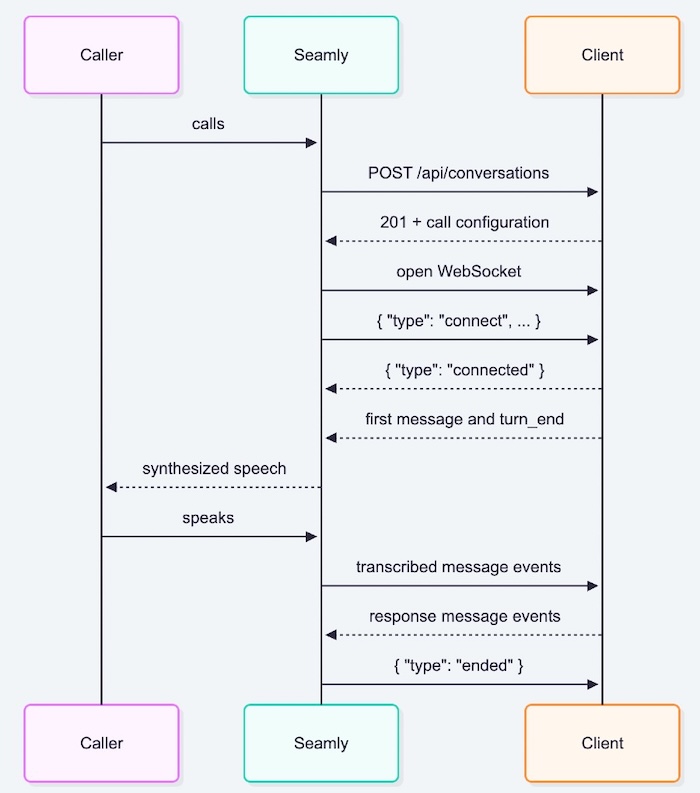
When a caller reaches a phone number assigned to your integration, Seamly first calls your HTTP endpoint. Your response determines how the call should be handled, including its language, participant name, voice, optional context, and WebSocket URL. Seamly then opens the WebSocket connection and both systems exchange messages until the call ends.
This model gives you control over conversation logic while Seamly handles the voice channel, speech recognition, speech synthesis, interruption handling, and call lifecycle.
Why implement the Voice API?
Implementing the Voice API gives your platform voice capabilities by implementing API endpoints.
This approach provides several benefits:
- You retain control over your conversation IDs, business logic, context, and message generation.
- Conversation-specific settings can be selected dynamically when a call begins.
- Text can be streamed to Seamly so speech synthesis can begin before a complete response is available.
- Your platform can decide when to end a call.
Integration architecture
The integration consists of an HTTP setup phase followed by a real-time WebSocket phase.
What you need to implement
Your platform must provide:
-
An HTTPS endpoint that accepts a
POSTrequest. -
Validation of Seamly's
X-Seamly-Signaturerequest header. see HMAC signature for more information. -
A secure WebSocket (
wss://) endpoint for each conversation. - A message handler that implements the WebSocket event sequences described in this guide.
- Logic that sends the first conversational message after acknowledging the WebSocket connection.
During onboarding, coordinate the following with Seamly:
- The URL of your HTTP endpoint.
- A shared secret used to verify Seamly's signed HTTP requests.
- The languages your integration may return, expressed as BCP-47 language tags.
- The countries in which phone numbers are required.
HMAC signature
All requests have a
X-Seamly-Signature
header containing a UNIX epoch timestamp in seconds as parameter
t
, and a scheme parameter
v1
containing the signature. The signature is calculated with a secret, the timestamp and the request payload (note that for these GET requests, the request payload does not exist). The secret will be provided to you.
The header looks like this:
X-Seamly-Signature: t=1597999043,v1=9f86d081884c7d659a2feaa0c55ad015a3bf4f1b2b0b822cd15d6c15b0f00a08
Seamly generates signatures using a hash-based message authentication code (
HMAC
) with
SHA-256
. You should ignore all schemes that are not
v1
.
It is possible to get multiple signatures with the same scheme in order to allow secret rotation and invalidation, one for each signature. An example header would then look like:
X-Seamly-Signature: t=1597999043,v1=9f86d081884c7d659a2feaa0c55ad015a3bf4f1b2b0b822cd15d6c15b0f00a08,
v1=90869314cc23cd66689f0d5cb78226255c41bfc60488c24ece99c2b16a1e538f
Signature verification
Verification should be done as follows:
-
Extract timestamp and signatures from header
Split the header, using the
,character as the separator, to get a list of elements. Then split each element, using the=character as the separator, to get a key and value pair.The value for the key
tis the UNIX epoch timestamp in seconds, andv1contains the signature(s). You can discard all other elements. -
Verify timestamp
The header contains a timestamp in order to prevent replay attacks . This timestamp cannot be modified as it is part of the signature. To verify the timestamp, get the current UNIX epoch timestamp in seconds on your machine (
tlocal) and verify if the timestamp in the headertwhen converted to integer lies within a certain tolerance (5 min is recommended).A JavaScript example might be as follows:
if (Math.abs(tlocal - t) < tolerance_in_s) { // Ok! } else { // This is either a replay attack or something is wrong with your or our server time } -
Create a payload string
Concatenate the following:
- The UNIX timestamp as string
-
A dot (
.) -
The request body as string (
""for GET requests)
For example:
1597999043. -
Generate the expected signature(s)
Generate the HMAC with SHA-256 hash function using the previously generated payload string and the configured secret. The output should be a hexadecimal string.
In C# this would look like:
using System;
using System.Security.Cryptography;
using System.Text;

class MainClass {
  public static void Main (string[] args) {
    var secret = new ASCIIEncoding().GetBytes("the secret");
    var payload = new ASCIIEncoding().GetBytes("1597999043.");
    var hashmessage = new HMACSHA256(secret).ComputeHash(payload);
    string.Concat(Array.ConvertAll(hashmessage, x => x.ToString("x2")));

    // The expected signature:
    Convert.ToBase64String(hashmessage);
  }
}
In Java this would look like:
import javax.crypto.Mac; import javax.crypto.spec.SecretKeySpec; import java.security.NoSuchAlgorithmException; import java.security.InvalidKeyException; import javax.xml.bind.DatatypeConverter; class Main { public static void main(String[] args) { String secret = "the secret"; String payload = "1597999043."; Mac hasher = Mac.getInstance("HmacSHA256"); hasher.init(new SecretKeySpec(secret.getBytes(), "HmacSHA256")); byte[] hash = hasher.doFinal(payload.getBytes()); // The expected signature: String signature = HexFormat.of().formatHex(hash); } } -
Compare signatures
Compare the generated signatures with all signatures in the header. At least one must match, otherwise the request is invalid.
Integration flow
1. Conversation/call start
When an incoming call is routed to your integration, Seamly sends an authenticated request to your conversation endpoint before the conversation starts.
POST /api/conversations
Content-Type: application/json
X-Seamly-Signature: <HMAC signature>
Request body
{
  "project_id": "c8dc0d63-19be-479e-b89c-c99276b7e023",
  "channel_name": "voice",
  "phone_number": "+31881111111",
  "environment": {
    "from_phone_anonymous": false,
    "from_phone_number": "+31612345678"
  }
}| Property | Type | Required | Description |
|---|---|---|---|
| project_id | string | Yes | UUID of the Seamly project. Use this to identify the relevant tenant or configuration in your system. |
| channel_name | string | Yes |
Name of the Seamly channel through which the call arrived. This is normally
voice
.
|
| phone_number | string | Yes | Dialled number in international E.164 format. |
| environment | object | Yes | Information about the caller and call environment. Additional properties may be added in the future. |
| environment.from_phone_anonymous | boolean | Yes | Whether the caller withheld their phone number. |
| environment.from_phone_number | string or null | Yes |
Caller's phone number in E.164 format, or
null
when unavailable.
|
The request schema permits additional properties at the top level and inside
environment
. Your implementation should ignore unknown properties rather than reject the request.
Successful response
Return HTTP
201 Created
with a JSON body that configures the conversation.
{
  "context": {
    "variables": {
      "customer_id": "C-10482",
      "customer_name": "Sam Jones"
    }
  },
  "conversation_id": "client-conversation-7f31a4",
  "language": "en-GB",
  "language_detection": {
    "language_candidates": ["en-GB", "nl-NL"]
  },
  "participant": {
    "name": "Sam Jones"
  },
  "speech_synthesis": {
    "voice": "49dczJmfGX7RoeudoOPi",
    "rate": 1.0
  },
  "user_silence_timeout": 30,
  "_links": {
    "socket": {
      "href": "wss://api.acme.com/conversations/client-conversation-7f31a4/websocket"
    }
  }
}
Response properties
| Property | Type | Required | Description |
|---|---|---|---|
| conversation_id | string | Yes | Conversation ID in your system. Use it to correlate the HTTP request, WebSocket connection, logs, and business records. |
| language | string | Yes | Initial language of the call. |
| participant.name | string | Yes | Display name used for the participant in Seamly conversation history. |
| speech_synthesis.voice | string | Yes | ElevenLabs voice ID used for speech synthesis. |
| speech_synthesis.rate | number | No |
Speaking-rate multiplier.
1.0
is normal speed; lower values are slower and higher values are faster.
|
| _links.socket.href | URI | Yes | Secure WebSocket URL Seamly must connect to for this conversation. |
| context.variables | object | No |
Arbitrary conversation context. Seamly returns these variables in the initial WebSocket
connect
event.
|
| language_detection.language_candidates | array | No |
Between two and four candidate languages. Include the value supplied in
language
. Detection applies to the caller's initial two turns.
|
| user_silence_timeout | integer | No |
Number of seconds of caller silence after which Seamly hangs up. Allowed range:
1
to
300
. The default is
30
.
|
The response schema does not allow unknown top-level properties or unknown properties inside the defined nested objects, except for context.variables, which may contain arbitrary conversation-specific key-value pairs.
Error responses
The specification defines the following error responses:
-
401 Unauthorizedwhen request authentication fails. -
500 Internal Server Errorwhen your bot or platform cannot create or configure the conversation.
Return errors in this format:
{
  "error": "Human-readable error message"
}
2. Accept the WebSocket connection
After validating the HTTP response, Seamly connects to the URL in
_links.socket.href
using a secure WebSocket connection.
Your WebSocket URL may contain a path parameter, signed token, or other correlation value needed by your bot or platform.
All messages are JSON objects with a
type
property.
3. Complete the connection handshake
As soon as the WebSocket is established, Seamly sends a
connect
event.
{
  "type": "connect",
  "context": {
    "variables": {
      "customer_id": "C-10482",
      "customer_name": "Sam Jones"
    }
  },
  "conversation_id": "client-conversation-7f31a4",
  "seamly_conversation_id": "01KY4HW2CESEDC0SQRRMQE0WPA"
}
After receiving
connect
for the initial connection, your bot or platform must:
-
Send a
connectedacknowledgement. - Immediately send the first conversational message.
-
End the first turn with
turn_endso Seamly knows the caller may respond.
{ "type": "connected" }
For subsequent connections to the same conversation, acknowledge
connect
and resume the conversation as described in
WebSocket reconnection
.
4. Exchange conversational messages
A conversational turn contains one or more messages. Each message consists of:
-
message_start -
One or more
message_partevents containing final transcript texts -
message_end
After all messages in the turn have been sent, send
turn_end
.
Complete message example
{ "type": "message_start", "interruptible": true, "language": "en-GB" }
{ "type": "message_part", "text": "Hello, " }
{ "type": "message_part", "text": "how may I help you?" }
{ "type": "message_end" }
{ "type": "turn_end" }
Seamly concatenates the text from consecutive
message_part
events. Include spaces and punctuation exactly where they belong. In the example above, the trailing space in
"Hello, "
is significant.
message_start
{
  "type": "message_start",
  "interruptible": true,
  "language": "en-GB"
}| Property | Description |
|---|---|
| interruptible | When your platform sends the message, determines whether the caller may interrupt its playback. |
| language |
Locale of the message. When language detection is enabled, Seamly reflects the detected caller language in incoming
message_start
events.
|
Although both fields are required by the schema in both directions,
interruptible
only affects messages sent from your platform to Seamly.
message_part
{
  "type": "message_part",
  "text": "Your streamed text"
}
A part may contain a complete message, a sentence, or even a single word. Sending smaller parts allows Seamly to start synthesizing and playing speech while your platform is still generating the rest of the response.
message_end
{ "type": "message_end" }
Send this after one or more
message_part
events. Follow it with another
message_start
when the same turn contains another message, or with
turn_end
when the turn is complete.
turn_end
{ "type": "turn_end" }
This event transfers control to the other party. Do not wait for the caller's next message until the current outgoing turn has been closed with
turn_end
.
5. Handle interruptions and committed text
When an outgoing message is interruptible, the caller may begin speaking before playback has finished. Seamly then sends
commit_turn
as soon as the interruption is detected.
{
  "type": "commit_turn",
  "text": "Hello, how may I "
}
The
text
value contains the portion the caller actually heard. Treat this value as the committed assistant output when updating your conversation history.
After receiving
commit_turn
:
-
Stop sending any remaining
message_partevents for the interrupted message. -
Do not send its pending
message_end. -
Wait for the caller's message sequence, which follows as
message_start, one or moremessage_partevents,message_end, andturn_end.
Your implementation should be able to cancel or disregard in-progress generation promptly when this event arrives.
6. End a call
Client-initiated hang-up
To instruct Seamly to end the call, send:
{ "type": "hangup" }In a bit Seamly will send and "ended" message and will close the websocket.
Call transfer
Transferring a call is not available yet. Do not use it until Seamly confirms support.
Seamly call-ended notification
At the end of the call, Seamly sends:
{ "type": "ended" }If Seamly has recorded the conversation, the ended message will contain the URL of the recording:
{
  "type": "ended",
  "recording": {
    "wav_file": "https://api.seamly-app.com/service-api/client/7cb4788f-1fd6-4bac-a280-c87d354b5058/conversations/01KY4HW2CESEDC0SQRRMQE0WPA/recording"
  }
}
This recording is available for 7 days and can be retrieved by sending a GET request to the
wav_file
URL. The request must be signed by setting the
X-Seamly-Signature
request header. The signing method is identical to how Seamly signs its requests. See the
HMAC signature
above for more information.
After receiving
ended
, finalize your conversation state and allow the WebSocket connection to close.
7. Report errors
Either side may send an
error
event:
{
  "type": "error",
  "reason": "validation_error",
  "description": "Unexpected field in message"
}| Property | Description |
|---|---|
| reason | Stable, machine-readable, atom-like error reason. |
| description | Human-readable explanation suitable for diagnostics. |
Log both fields together with the partner conversation ID and Seamly conversation ULID. Do not include secrets or unnecessary personal data.
Error handling
Seamly reports WebSocket protocol errors to your platform and attempts to reconnect when an established connection is lost. You cannot currently configure recovery from unrecoverable failures. If Seamly cannot recover, the call ends without an error message being spoken to the caller.
Conversation setup failures
Your HTTP endpoint must return
201 Created
with a valid conversation configuration. HTTP failures, invalid JSON or response fields, unavailable languages, and invalid speech settings prevent Seamly from starting the conversation. Your WebSocket URL must use
wss://
.
Seamly cannot currently report these setup failures back to you through the Voice API. Setup also fails if Seamly cannot establish the initial WebSocket connection. The reconnection behaviour below applies only after a WebSocket connection has been established.
WebSocket protocol errors
If your platform sends a JSON message that fails validation or violates the expected message sequence, Seamly responds with an
error
message:
{
  "type": "error",
  "reason": "unexpected_message",
  "description": "Unexpected message_part message, send a 'connected' message first"
}| Reason | Examples | Handling |
|---|---|---|
| validation_error | Invalid message fields, an invalid language tag, or a language that is not enabled for your project | Seamly rejects the message and keeps the connection open. |
| unexpected_message |
Sending messages before
connected
, sending
message_part
without an open message, sending empty or whitespace-only text, or ending a turn before ending its message
|
Seamly rejects the message and keeps the connection open. |
Correct the rejected message and continue from the last accepted message in the sequence. An error does not reset the current message or turn. If you send malformed JSON, Seamly closes the WebSocket connection and attempts reconnection instead of returning an
error
message.
After you have sent the
connected
acknowledgement, Seamly only logs valid
error
messages sent by your platform. Sending an
error
does not trigger recovery, end the call, reset the current turn, or produce speech for the caller. To explain a failure to the caller while the connection is available, send a conversational message using the normal message sequence. You can then send
hangup
to end the call.
WebSocket reconnection
Your WebSocket endpoint must accept new connections for an existing conversation. When an established connection is lost, Seamly attempts to reconnect to the same URL and sends a new
connect
message containing both conversation IDs and the current context variables. Use these IDs to identify the existing conversation and acknowledge the connection with
connected
. Resume the conversation rather than creating a new one or repeating the initial greeting.
Account for the following behaviour in your integration:
- Seamly attempts reconnection immediately, allowing up to three reconnect attempts within a five-second window. A later disconnection outside that window starts a new retry budget.
-
If a reconnect attempt fails to establish a connection, or the retry budget is exhausted, Seamly stops trying to reconnect and ends the call. Do not rely on receiving a final
errororendedmessage over the unavailable connection. -
Seamly queues caller messages received while disconnected and sends them after you acknowledge the new connection with
connected. -
There is no explicit timeout for your
connectedacknowledgement in the Voice API session. Acknowledge promptly so queued caller messages can be delivered. -
After Seamly accepts your
hangupmessage, it does not reconnect when the socket closes.
Message delivery during reconnection
A successful reconnection does not guarantee that all messages were delivered. Seamly does not automatically replay WebSocket frames it already sent, and a connection can fail partway through a streamed message or turn. Your platform may therefore receive an incomplete message or turn. Likewise, do not assume that Seamly received every frame you sent just before the disconnection.
WebSocket event reference
Events sent by Seamly to your platform
| Event | Purpose |
|---|---|
| connect | Initiates the application-level connection and supplies context plus Seamly's and partner-side's conversation identifiers. |
| message_start | Starts a caller message. |
| message_part | Supplies part of the caller's transcribed text. |
| message_end | Marks the end of one caller message. |
| turn_end | Marks the end of the caller's turn. |
| commit_turn | Reports how much of an interruptible partner message the caller actually heard. |
| ended | Reports that the call has ended. |
| error | Reports a protocol or processing error. |
Events sent by your platform to Seamly
| Event | Purpose |
|---|---|
| connected |
Acknowledges Seamly's
connect
event.
|
| message_start | Starts an outgoing message and defines its language and interruptibility. |
| message_part | Supplies all or part of the text Seamly should synthesize. |
| message_end | Marks the end of one outgoing message. |
| turn_end | Marks the end of your bot or platforms turn. |
| hangup | Instructs Seamly to end the call. |
| transfer | Reserved for future call-transfer support; currently unavailable . |
| error | Reports a protocol or processing error. |
Message sequencing rules
Your implementation should enforce these rules:
-
Wait for
connectbefore sendingconnectedor conversation content. -
Send exactly one
connectedacknowledgement for each WebSocket connection. -
On the initial connection, send the first conversational message immediately after
connected. After reconnection, resume the existing conversation without repeating the greeting. -
Begin every text message with
message_start. -
Send at least one
message_partbeforemessage_end. -
Preserve spaces between streamed
message_partvalues. -
Send
turn_endonly after all messages in the turn have ended. -
Stop sending an interruptible message after receiving
commit_turn.
Language handling
Return a valid initial locale in the HTTP
language
property. Seamly uses that locale for speech recognition and speech synthesis configuration.
To enable language detection, return
language_detection.language_candidates
containing between two and four locales. The initial
language
must also be included in that list. Seamly applies detection to the caller's first two turns and reports the active language in incoming
message_start
events.
Speech synthesis and streaming
Seamly currently uses ElevenLabs EU for speech synthesis. Return an ElevenLabs voice ID from the EU residency in
speech_synthesis.voice
. You may also return a
rate
multiplier.
For responsive conversations, stream generated output using multiple
message_part
events. Seamly can begin speaking before your model has generated the entire response. Choose part boundaries that preserve correct spacing and natural pronunciation.
When sending content that must not be interrupted, set
interruptible
to
false
. Follow it with a separate message marked
interruptible: true
when only part of a turn must be protected from interruption.
Context and correlation
Use
context.variables
for information your platform wants Seamly to carry into the WebSocket session, such as a customer identifier, CRM lookup result, routing decision, or short-lived verification value.
Do not use context variables for secrets that do not need to leave your system. Treat all context as conversation data that may appear in operational logs or conversation records.
For reliable diagnostics, correlate:
-
project_idfrom the HTTP request. -
Your
conversation_idfrom the HTTP response. -
Seamly's ULID from the WebSocket
connectevent. - The dialed phone number and channel name.
Security recommendations
-
Verify the
X-Seamly-Signaturebefore processing a conversation request. - Compare signatures using a constant-time comparison function.
- Reject malformed JSON and invalid message sequences.
- Return a short-lived credential or signed value as a variable in your API endpoint and validate the variable when Seamly sends the connect websocket message.
Specification files
This guide describes the behaviour defined by:
- OpenAPI — HTTP conversation creation and configuration.
- AsyncAPI — WebSocket connection and message events.
Treat the machine-readable specifications as the authoritative schema definitions. This guide explains how to combine them into a working partner integration and highlights operational details that must be agreed with Seamly during onboarding.