
Authenticated conversations
Authenticated conversations allow you to securely provide Seamly with an external ID and/or user data. An external ID is used by Seamly to allow conversations to run indefinitely, also referred to as hibernated conversations or messaging. The user data can be used for a variety of purposes, for instance for personalisation, or in order to create custom answers for specific users. Any piece of data related to the current user may be used.
In order to work with authenticated conversations, you need to implement the Conversation Authentication API, and a JavaScript callback function in your front-end to pass a token to the Seamly Web-UI.
If you use the Channel API instead of the Seamly Web-UI, the token must be passed to Seamly when creating a new conversation, in place of the JavaScript callback function.
A high level overview of the flow is as follows:
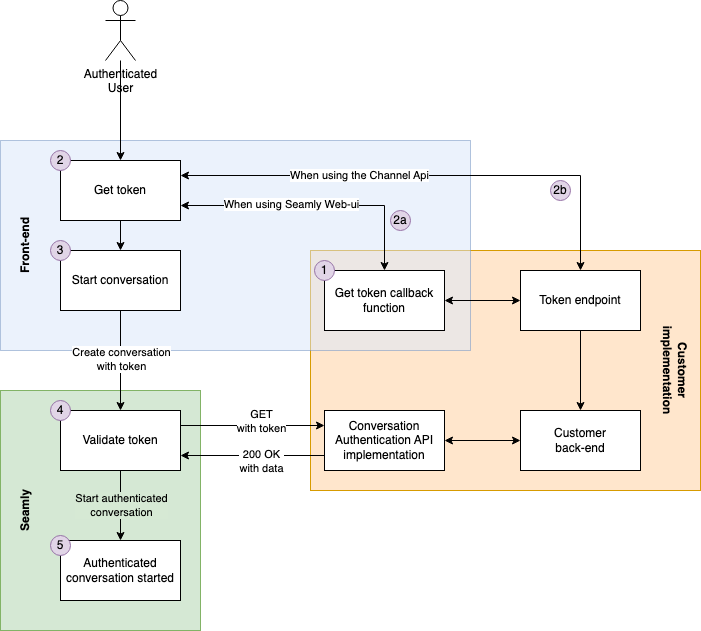
- If using the Seamly Web-UI : You provide a JavaScript callback function which returns a unique (and preferably short-lived) token.
-
The token is fetched.
- If using the Seamly Web-UI : (2a) The Seamly client will call your Javascript callback function.
- If using the Channel API : (2b) Implement your own logic to get a token.
-
The token is passed to the Seamly server, along with the POST request to create a new conversation.
- If using the Seamly Web-UI : This happens automatically.
-
If using the Channel API
: You must pass the token in the body of the request to create a new conversation. See the
createConversationrequest in the OpenAPI Specs.
-
The Seamly server sends a request to your Conversation Authentication API. Seamly sends the token along with the request.
-
You return an API response with the following specifications:
-
You indicate the token is valid with a response of
200 OK. Seamly will then consider the conversation to have been be created as 'authenticated'. This can then be used throughout the conversation to, for example, provide specific content geared towards logged in users. - (OPTIONAL) You return an external ID in the response body.
- (OPTIONAL) You return user data in the response body.
-
You indicate the token is valid with a response of
- If you provide an external ID, Seamly tries to resume the conversation with the provided ID. If no conversations with this ID exist, a new conversation is created and associated with the provided ID.
- If you provide user data, the data is stored in the conversation state.
-
You return an API response with the following specifications:
- The Seamly client presents the chat window.
Get started
We make a distinction between using the Seamly Web-UI and using the Channel API for authenticated conversations.
Seamly Web-UI
- You set up your infrastructure to be able to generate a short-lived token for the current user. You may need to implement an API endpoint to retrieve such a token.
- You implement a Javascript function to fetch and return this token.
- You implement a new Conversation Authentication API according to our specifications.
-
You
provide Seamly with the following information:
- The name of the Javascript function as implemented in step 2.
- Your API endpoint URL as implemented in step 3.
- Any additional headers you want Seamly to send along with each request.
- Seamly will enable and configure the Authenticated Conversation feature in the Seamly acceptance environment and provide you with the secret Seamly will sign requests with.
- Seamly will add support to your Seamly client implementation to use the feature.
- Seamly will help you to test the complete setup.
All steps are described in more detail in the next sections of this document.
Seamly Channel API
- You set up your infrastructure to be able to generate a short-lived token for the current user. You may need to implement an API endpoint to retrieve such a token.
- You update your client-side implementation to fetch this token, and to send it along with the request in order to create the conversation.
- You implement a new Conversation Authentication API according to our specifications.
-
You
provide Seamly with the following information:
- Your API endpoint URL as implemented in step 3.
- Any additional headers you want Seamly to send along with each request.
- Seamly will enable and configure the Authenticated Conversation feature in the Seamly acceptance environment and provide you with the secret Seamly will sign requests with.
- Seamly will help you to test the complete setup.
All steps are described in more detail in the next sections of this document.
Front-end changes using the Seamly Web-UI
Please skip this section if you use the Channel API.
You will need to provide a JavaScript function that Seamly can use to obtain a token. This function must be available on all pages where Seamly is present, and must be defined before Seamly is initialized. Seamly calls this function when it needs to create a new conversation; in practice this means the very first time Seamly is initialized, and when the visitor has left the website for too long and the conversation is no longer available.
It is important for the function to return a token as quickly as possible. The same applies to your Conversation Authentication API response, as the whole process must finish executing before a chat window can be shown (flowchart step 5). That said, it is possible to provide an async function that, for example, fetches a token on demand via an XHR request from an API.
The token must be minimum 32 characters long. The validity period should be limited if possible for increased security. Seamly does not store the token, nor use it twice.
An example implementation might look like:
const getSeamlyToken = async () => {
  return "some_token"
}

window.seamly = window.seamly || []

window.seamly.push({
  action: "init",
  args: {
    parentElement: document.querySelector('.seamly-placeholder'),
    api: {
      getConversationAuthToken: getSeamlyToken,
    },
  }
})
Debugging
If you run into problems, you can perform the following steps to determine what went wrong.
1. Add a
console.log
statement to your function that provides the token.
Modify your function:
const getSeamlyToken = async () => {
  const token = "some_token"
  console.log("getSeamlyToken called, returning token:", token)
  return token
}
Next, clear your browser's session storage, local storage and cookies to make sure a new Seamly conversation is started.
Once you open your website and Seamly (if displayed in a popup window) you should see your log statement in your browser's console. If it does not appear, please make sure you have properly cleared your browser's storage. Afterwards, check your browser's network tab and verify that an actual new Seamly conversation is created: you should see a POST request to our conversations endpoint (
https://api.(uat.)seamly-app.com/client/[api-key]/conversations?srv_id=[some-id]&v=[version]
). Your callback function is only called when this request is sent.
2. Make sure your token is sent
First, clear your browser's storage, then open your browser's Network tab to see all requests. Navigate to your website and open Seamly (if displayed in a popup window). Look for the POST request to our conversations endpoint (
https://api.(uat.)seamly-app.com/client/[api-key]/conversations?srv_id=[some-id]&v=[version]
).
Your token should be sent in the request body (also called Request Payload) of this request. It should look like
{"token": "some_token"}
.
If your token is sent, check the response of the request. It should have status code
201 Created
. If this is not the status code, please check the body of the response for any error messages.
3. Validate the success of the request to your API
If the steps above succeed, but you are still having problems, please contact Seamly support so that Seamly can verify the request sent to your API.
Client changes using the Channel Api
Please skip this section if you use the Seamly Web-UI.
If using the Channel API, you need to pass the token in the request body of the request to create a new conversation. See the
createConversation
request in the OpenAPI Specs.
Back-end
You need to implement the Conversation Authentication API to validate the token. The Conversation Authentication API needs to expose an API endpoint to receive a (bearer) token, to validate the token, and to return, if the token is valid, an
external_id
and/or user data.
Request
Seamly will send a plain GET request with two headers to the provided endpoint:
-
Authorizationwith the token as a bearer token -
X-Seamly-Signaturesee HMAC signature for more information
Response
The API must respond with a 200 status code and the response must be a JSON encoded object:
-
(OPTIONAL)
external_id: An ID uniquely identifying the user. When anexternal_idis returned Seamly will try to resume a previous conversation with thatexternal_id. As such, it is crucial that this identifier is not guessable nor directly derivable from a user's meta data (for instance, you should not use a simple hash of the user's e-mail address or account number). Theexternal_idmust be at least 32 characters long. Shorter values will result in an error. -
(OPTIONAL)
variables: A map of key-value pairs with user data. The variables will be stored in the conversation in Seamly.
A conversation will be marked as 'authenticated' if a
200 OK
response was received, even if both
external_id
and
variables
are omitted.
For example:
{
  "external_id": "58FFTEsQp8V4E9mAQf1O3YFfTKAzGEX3",
  "variables": {
    "name": "John",
    "age": 53
  }
}
If your API returns anything other than a
200 OK
response, creating a new conversation will fail and the user will be presented with a generic error.
OpenAPI specification
Please refer to the OpenAPI specification for a detailed guide on the API and its components. You may use this specification to validate your Conversation Authentication API implementation and to ensure it works well with Seamly's authenticated conversation system.
Security
Seamly offer two ways of verifying that the requests come from the Seamly platform. The two methods may be combined.
- Using an HMAC signature that includes the current time and a shared secret at least 256 bit in length. This has the advantage of making the payload tamper proof and protecting against replay attacks if the signature is verified correctly. It is also possible to rotate the shared secrets without outage.
- Using Mutual TLS . Mutual TLS can be easier to set up if your API gateway supports it. The disadvantage is that certificates need to be replaced at the same time, which may lead to outage.
HMAC signature
All requests have a
X-Seamly-Signature
header containing a UNIX epoch timestamp in seconds as parameter
t
, and a scheme parameter
v1
containing the signature. The signature is calculated with a secret, the timestamp and the request payload (note that for these GET requests, the request payload does not exist). The secret will be provided to you.
The header looks like this:
X-Seamly-Signature: t=1597999043,v1=9f86d081884c7d659a2feaa0c55ad015a3bf4f1b2b0b822cd15d6c15b0f00a08
Seamly generates signatures using a hash-based message authentication code (
HMAC
) with
SHA-256
. You should ignore all schemes that are not
v1
.
It is possible to get multiple signatures with the same scheme in order to allow secret rotation and invalidation, one for each signature. An example header would then look like:
X-Seamly-Signature: t=1597999043,v1=9f86d081884c7d659a2feaa0c55ad015a3bf4f1b2b0b822cd15d6c15b0f00a08,
v1=90869314cc23cd66689f0d5cb78226255c41bfc60488c24ece99c2b16a1e538f
Signature verification
Verification should be done as follows:
-
Extract timestamp and signatures from header
Split the header, using the
,character as the separator, to get a list of elements. Then split each element, using the=character as the separator, to get a key and value pair.The value for the key
tis the UNIX epoch timestamp in seconds, andv1contains the signature(s). You can discard all other elements. -
Verify timestamp
The header contains a timestamp in order to prevent replay attacks . This timestamp cannot be modified as it is part of the signature. To verify the timestamp, get the current UNIX epoch timestamp in seconds on your machine (
tlocal) and verify if the timestamp in the headertwhen converted to integer lies within a certain tolerance (5 min is recommended).A JavaScript example might be as follows:
if (Math.abs(tlocal - t) < tolerance_in_s) { // Ok! } else { // This is either a replay attack or something is wrong with your or our server time } -
Create a payload string
Concatenate the following:
- The UNIX timestamp as string
-
A dot (
.) -
The request body as string (
""for GET requests)
For example:
1597999043. -
Generate the expected signature(s)
Generate the HMAC with SHA-256 hash function using the previously generated payload string and the configured secret. The output should be a hexadecimal string.
In C# this would look like:
using System;
using System.Security.Cryptography;
using System.Text;

class MainClass {
  public static void Main (string[] args) {
    var secret = new ASCIIEncoding().GetBytes("the secret");
    var payload = new ASCIIEncoding().GetBytes("1597999043.");
    var hashmessage = new HMACSHA256(secret).ComputeHash(payload);
    string.Concat(Array.ConvertAll(hashmessage, x => x.ToString("x2")));

    // The expected signature:
    Convert.ToBase64String(hashmessage);
  }
}
In Java this would look like:
import javax.crypto.Mac; import javax.crypto.spec.SecretKeySpec; import java.security.NoSuchAlgorithmException; import java.security.InvalidKeyException; import javax.xml.bind.DatatypeConverter; class Main { public static void main(String[] args) { String secret = "the secret"; String payload = "1597999043."; Mac hasher = Mac.getInstance("HmacSHA256"); hasher.init(new SecretKeySpec(secret.getBytes(), "HmacSHA256")); byte[] hash = hasher.doFinal(payload.getBytes()); // The expected signature: String signature = HexFormat.of().formatHex(hash); } } -
Compare signatures
Compare the generated signatures with all signatures in the header. At least one must match, otherwise the request is invalid.
Mutual TLS
Mutual TLS allows the receiving server (in this case, the server receiving the webhook request) to verify the TLS certificate presented by Seamly during the request.
The client certificate used for Mutual TLS is the same as on
https://api.seamly-app.com/
. If you need to import the certificate as PEM, please get touch with your Seamly contact.